Household plans
IPTV on multiple devices: devices or accounts?
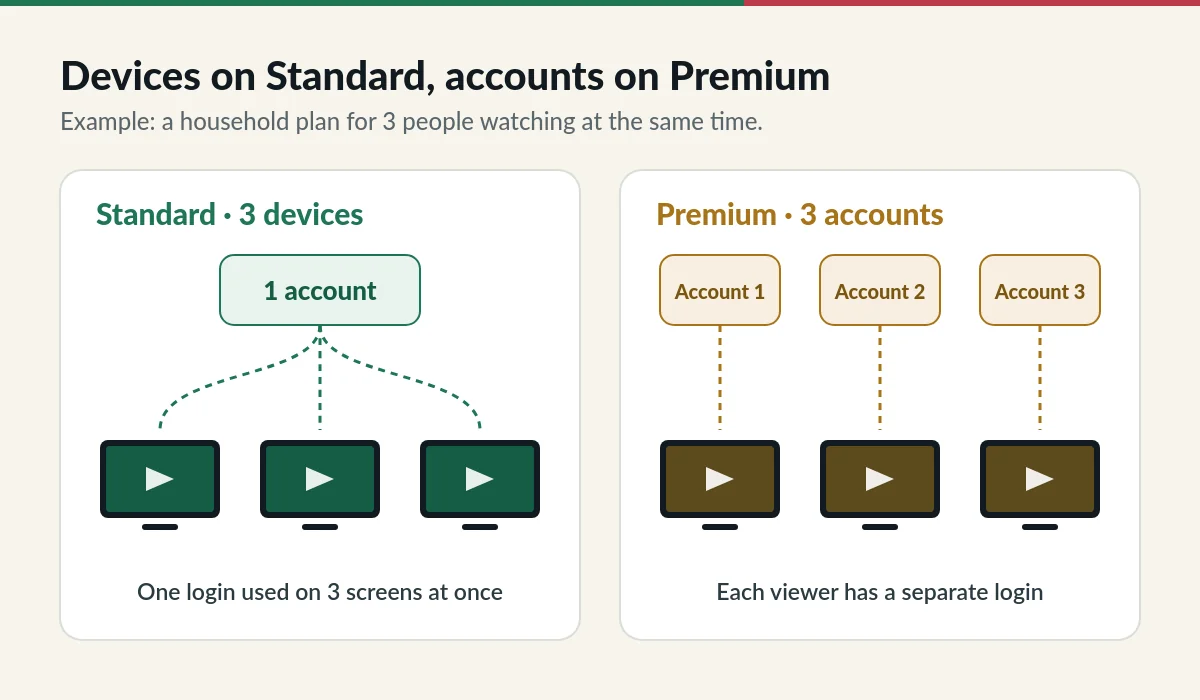
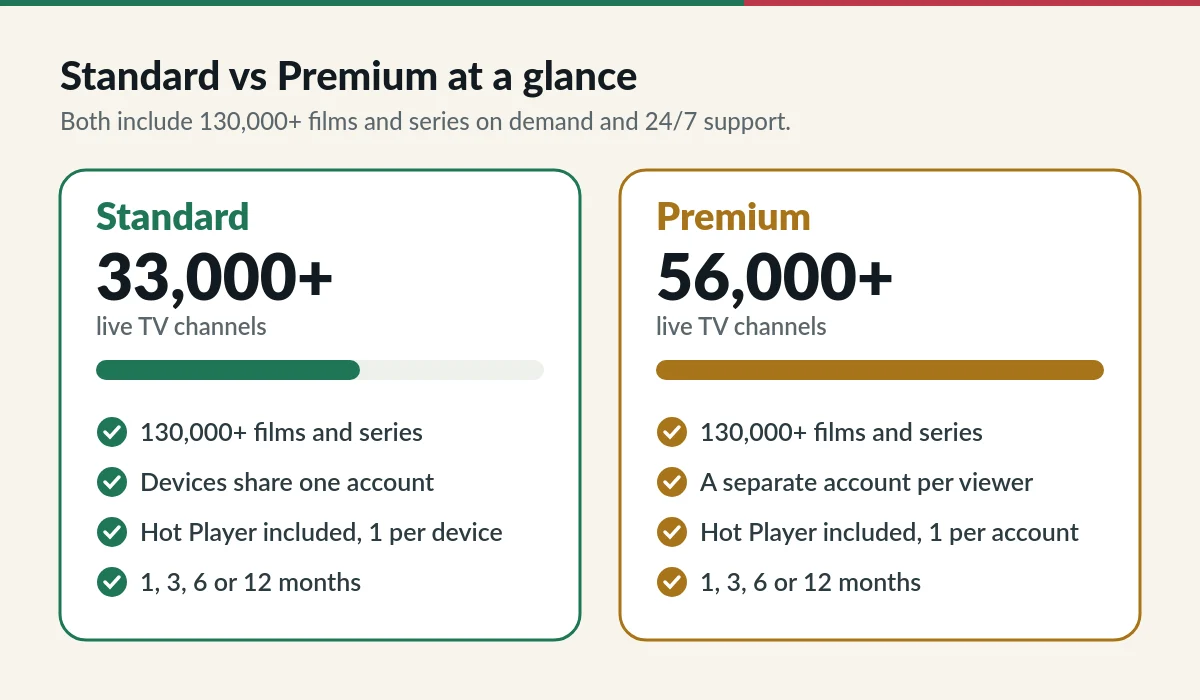
IPTV multiple devices plans let 2 or 3 people watch at the same time. On Standard, those devices share one account. On Premium, each person gets a separate account. This page explains which one suits your home.
What 2 or 3 means on an IPTV multiple devices plan
The number on a household plan is the number of screens that can play at the same time. Installing the app on more devices is fine, but only that many can stream at once. A plan for 1 device or account plays on one screen at a time.

Standard: IPTV on multiple devices with one account
With a Standard plan for 2 or 3 devices, everyone uses the same login. It is the simplest and most affordable option when your household is happy to share favourites and settings. Example: a TV in the living room, a tablet and a phone watching three different channels in the evening.
Premium: multiple devices, separate accounts
With a Premium plan for 2 or 3 accounts, you receive separate logins. Each person keeps their own favourites and history, and one viewer does not affect another. Premium also has the larger 56,000+ live line-up. On both levels, each device or account gets its own Hot Player activation.
Household prices (S$)
| Duration | Standard, 2 devices | Standard, 3 devices | Premium, 2 accounts | Premium, 3 accounts |
|---|---|---|---|---|
| 1 month | S$22 | S$30 | S$40 | S$55 |
| 3 months | S$50 | S$70 | S$95 | S$130 |
| 6 months | S$80 | S$110 | S$160 | S$220 |
| 12 months | S$130 | S$150 | S$250 | S$340 |
Household plans come in 1, 3, 6 and 12 months, without free months, and include a Hot Player activation for each device or account. All prices are also in the price selector.
Tips for watching IPTV on several screens at once
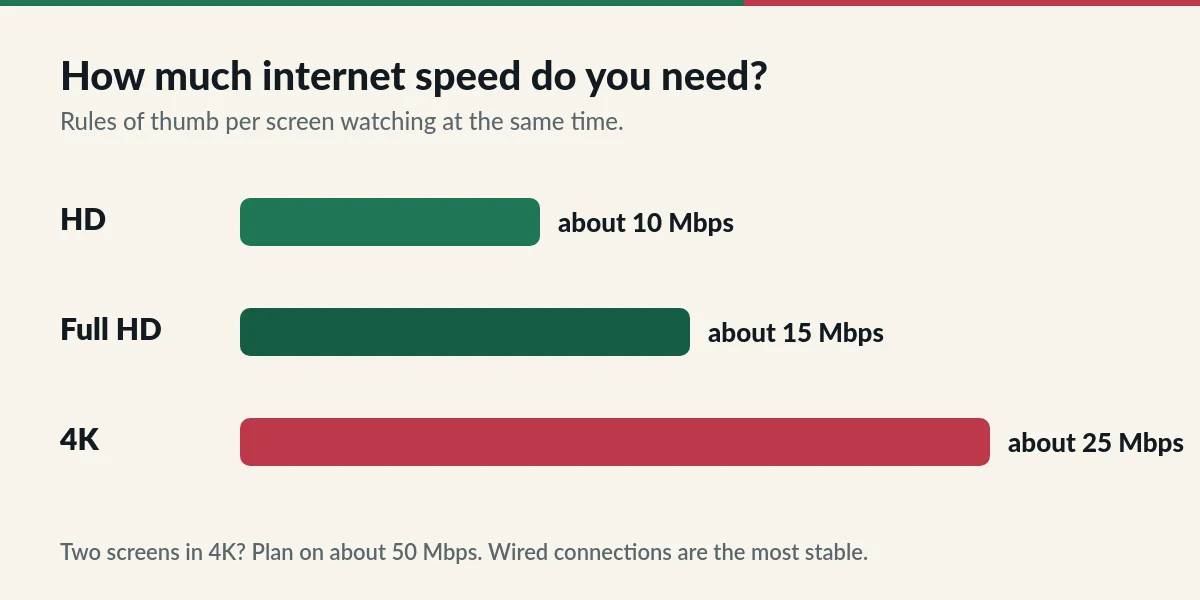
- Allow about 10 Mbps per screen in HD and about 25 Mbps per screen in 4K.
- Connect the main TV with a network cable if you can; it keeps Wi-Fi free for phones and tablets.
- Keep your login inside your household plan. Using it on more screens than your plan allows makes streams stop.
- If a stream freezes, our IPTV troubleshooting guide lists quick fixes.
Wikipedia has a short explanation of how streaming media works, which is useful if you are new to IPTV.
IPTV multiple devices: three household examples
- Two viewers, shared favourites: a TV in the living room and a phone in the bedroom on Standard, 2 devices.
- Three viewers, shared account: TV, tablet and laptop on Standard, 3 devices, for a family that watches together but sometimes in different rooms.
- Three viewers, own logins: Premium, 3 accounts, when each person wants their own favourites, history and settings.
How simultaneous streams are counted
A stream counts while a channel or film is playing. If the app is open but nothing plays, it does not use a stream. When you reach the number of screens on your plan, the next device that starts playing will be refused or will stop another stream, depending on the app. Close the player on one device before starting another, or choose a plan with one more screen.
Questions about watching on several screens
Can I install the app on more devices than my plan?
Yes. You can install the app on as many of your own devices as you like. Only the number of screens on your plan can play at the same time.
Can I add a device later?
Yes. Contact us and we will explain how to move to a plan with more devices or accounts. Renewal time is a convenient moment to change.
Do separate Premium accounts have separate favourites?
Yes. Each Premium account has its own login, so favourites and viewing history stay separate.
Can I use one plan in two different homes?
Plans are meant for one household. Using one login across different homes usually causes streams to stop when the screen limit is reached.
Choose your household plan
Pick Standard for shared devices or Premium for separate accounts.