Guide
Xtream Codes explained
The three login details, signing in step by step and error messages.
Explainer
EPG stands for electronic programme guide: the TV guide inside your IPTV app that shows what is on now, what comes next and when it ends. Here is how EPG IPTV data reaches your screen, why the times can look wrong in Singapore, and six quick fixes for a guide that stays empty.
EPG is short for electronic programme guide (“program guide” in American English). It is the on-screen TV guide that replaced the listings page in the newspaper: a grid with channels down the side and time along the top. In an IPTV app it does three jobs. It shows what is on now, it helps you plan what to watch later, and it takes you straight to a channel when you pick a programme.
The guide is not part of the video. It is a separate list of programme times that your app downloads and lines up with your channels. That explains a puzzle many people meet in their first week: the channels play perfectly, yet the guide is empty. Fixing the guide never touches the picture, and a guide problem is never a sign that your subscription is broken.
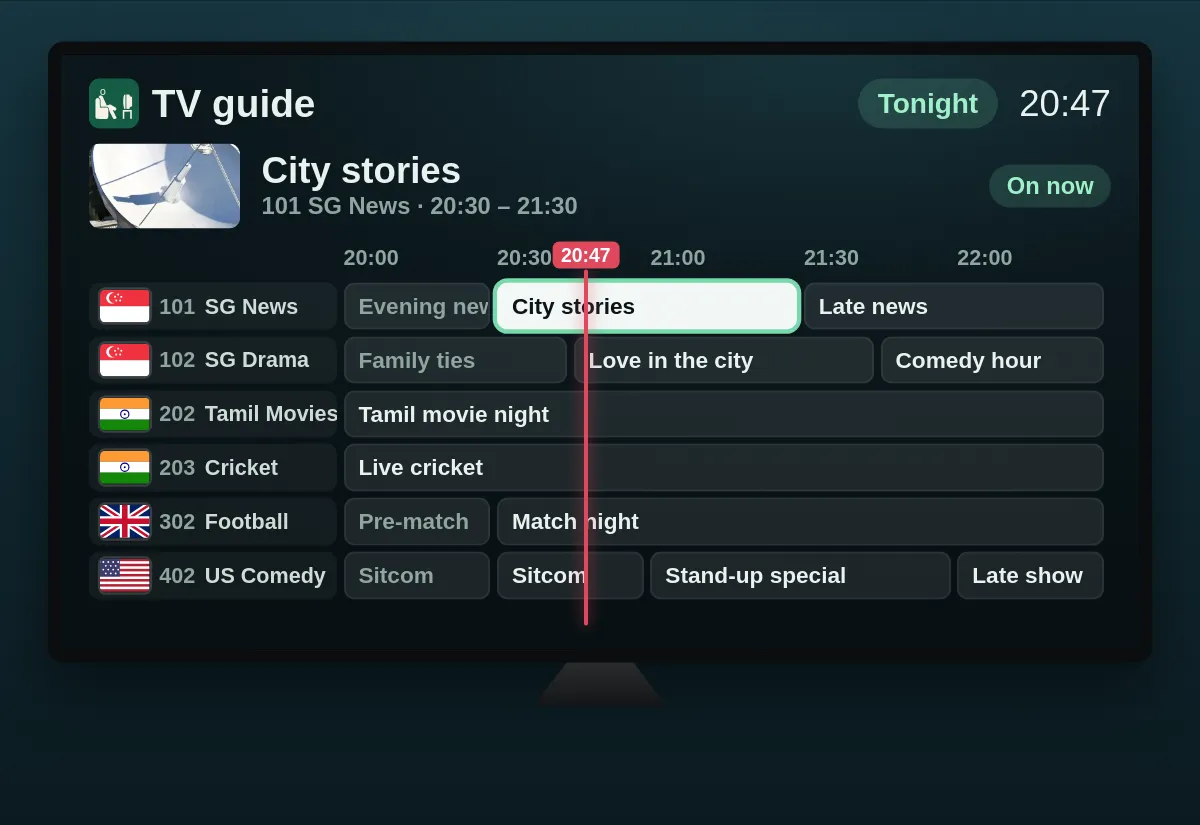
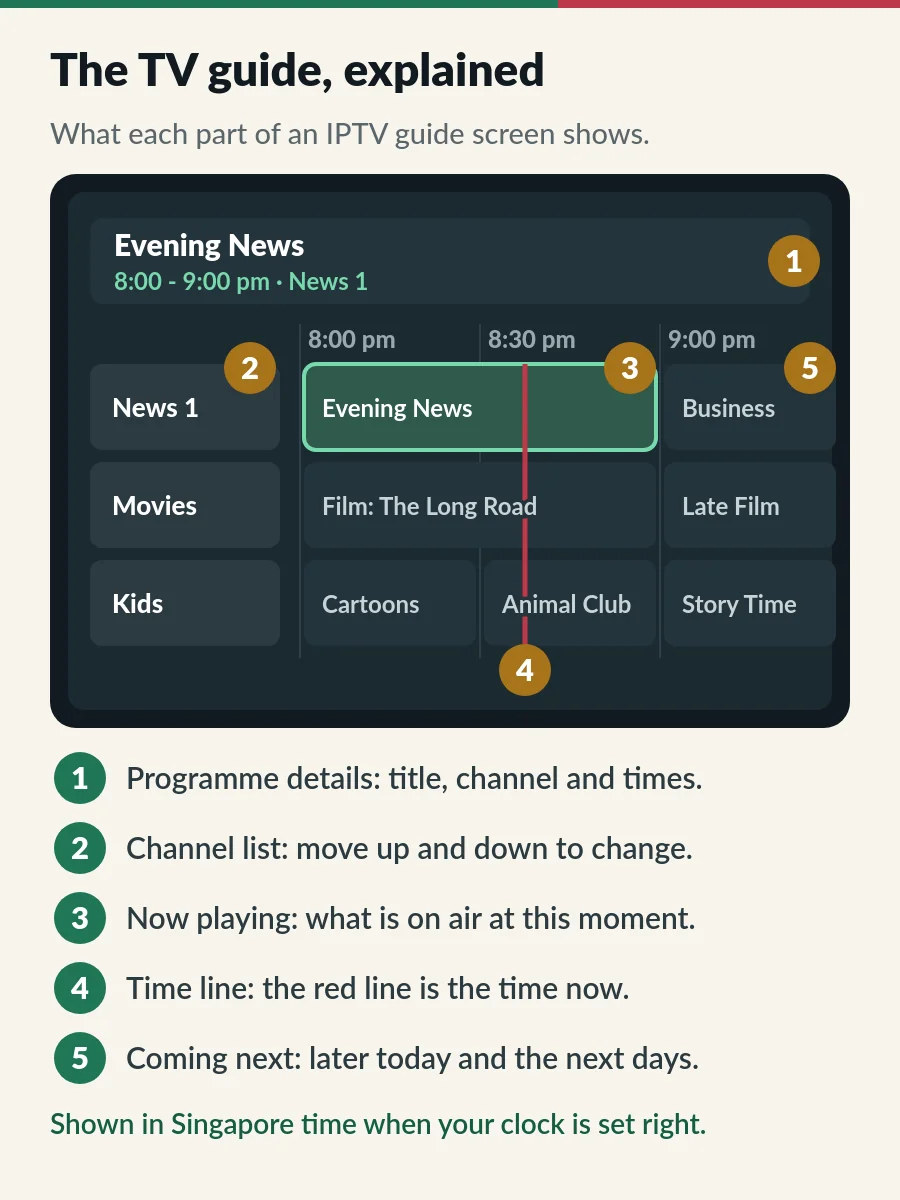
Once you can read one guide, you can read them all. The red line is the time now: anything to its left has finished and anything to its right is still to come. Select a programme that is on air to watch it, or a later one to see what it is about. Some apps also let you set a reminder or record from the guide, where the app and the channel support it.
Step 4 is where most guide problems begin. If a channel’s ID in your playlist does not match one in the guide file, that channel shows “No information” even though it plays normally. Nothing is wrong with your setup. Tell us the channel name and we look into it.
The guide also only reaches a few days ahead, not weeks. How far depends on the channel and on the app, since many apps keep only a few days to save memory. The history of the electronic programme guide goes back to cable TV in the 1980s; IPTV apps simply download the same kind of data over the internet.
How you signed in decides how the guide arrives:
| Xtream Codes login | M3U link | |
|---|---|---|
| TV guide | Loads by itself in most apps | Often needs a separate EPG link |
| Where it comes from | The same server as your channels | An EPG URL you add in the app, or one listed inside the playlist |
| Best for | Everyday viewing on a TV | Quick tests, VLC and Kodi |
If your app asks for an “EPG URL” or “XMLTV URL” and you only have a username and password, message us with the app name and we send the right link. New to these terms? Our guides to Xtream Codes and M3U playlists explain both logins in plain English.
Singapore runs on UTC+8 all year, with no daylight saving. A guide file stores every programme time together with its time zone, and your app converts it to the clock on your device. So if the device is set to the wrong time zone, every programme in the guide shifts by the same number of hours.
A quick test: find a channel that is showing something right now and compare it with the guide. If every channel is out by the same whole number of hours, the time zone is the problem, not the channels.
Channels from other countries can look odd for a different reason. The guide shows their programmes in Singapore time, which is exactly what it should do:
| When it is 8 pm in… | Your guide shows |
|---|---|
| Malaysia, the Philippines, Hong Kong, China, Taiwan | 8:00 pm (same time as Singapore) |
| Indonesia (Jakarta), Thailand, Vietnam | 9:00 pm |
| India and Sri Lanka | 10:30 pm |
| Japan and South Korea | 7:00 pm |
| United Kingdom | 4:00 am the next day (3:00 am from late March to late October) |
So a guide that lists an Indian prime-time serial at 10:30 pm is right. A Malaysian channel that looks hours out, on the other hand, points to a clock or guide problem worth fixing.
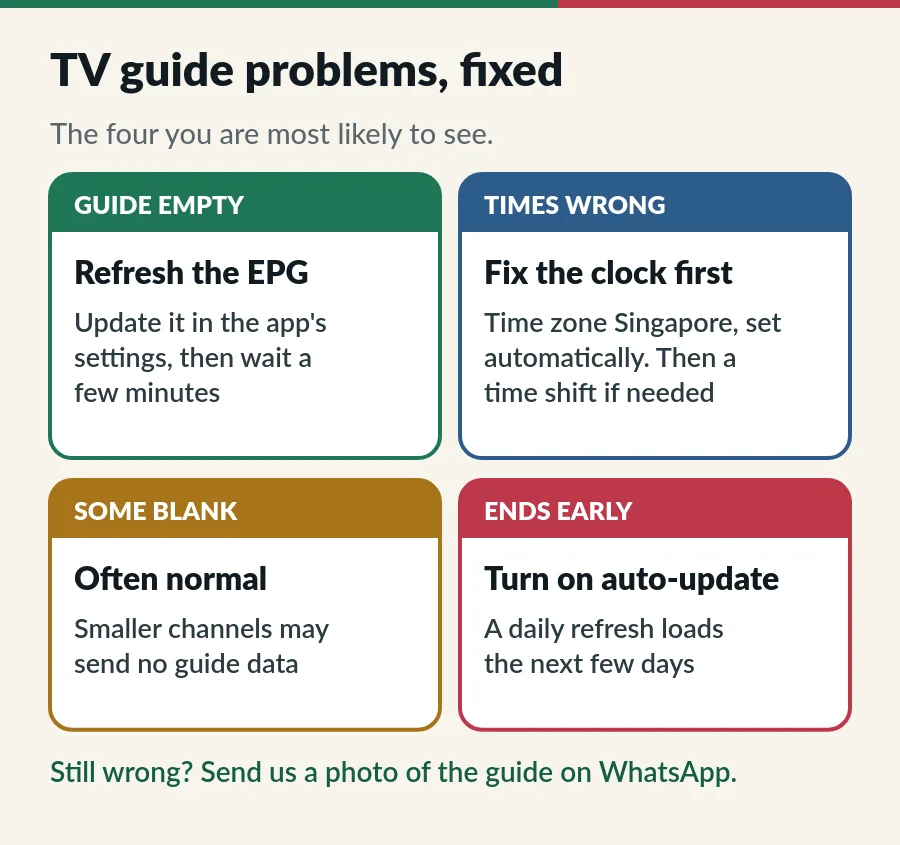
| Problem | Try this |
|---|---|
| 1. The whole guide is empty | Open the app settings and update (or refresh) the EPG, then wait a few minutes. The first download is the biggest. |
| 2. Every programme is hours out | Set the device date and time to automatic and the time zone to Singapore. Restart the app, then refresh the guide. |
| 3. Still out by the same amount | Look for an “EPG time shift” setting in the player and enter the difference. Use it only when the device clock is already right. |
| 4. One channel says “No information” | That channel may send no guide data, or its ID does not match. Tell us which channel. |
| 5. The guide stops after a day or two | Turn on automatic EPG updates. Once a day is enough to keep the next days loading. |
| 6. The app slows down in the guide | Big guides use memory. Clear the app cache, hide channel groups you never watch, and restart the device. |
If the picture freezes or buffers, that is a different problem from the guide: see our IPTV buffering fix. Using IPTV Smarters Pro? Its guide settings are in our IPTV Smarters Pro setup guide.
With your EPG IPTV guide set up, here is how to choose a plan, order it and keep it running.
Electronic programme guide. It is the TV guide in your IPTV app, listing what is on each channel now, next and over the coming days.
No. The guide data comes from your provider along with the channels. You may only need to switch it on or refresh it in your app.
Usually the app has not downloaded it yet. Refresh the EPG in the app settings and give it a few minutes. If you signed in with an M3U link, the app may need a separate EPG link.
Check the device time zone first: it should be Singapore, set automatically. Remember that channels from other countries show in Singapore time, so an 8 pm show in India appears at 10:30 pm.
No. Most large channels do, but some smaller or regional channels send no guide data. They still play normally.
Guide
The three login details, signing in step by step and error messages.
Guide
What is inside the link, three apps to open it and how to keep it safe.
Guide
Install the app, sign in with Xtream Codes and fix login errors.
Page
Freezing, buffering and login problems, fixed in order.
Send us your app name and a photo of the guide on WhatsApp. We help you set it up, 24/7.