Page
IPTV Singapore channels list
Search 12,000+ live channels by country.
Picture guide
4K IPTV gives you four times the detail of Full HD, but only when five things line up: your TV, your device, the video format, your connection and the channel itself. Here is how to check each one in a few minutes, and what to do when 4K looks soft or stutters.
4K IPTV is TV over the internet at 3840 × 2160 pixels: four times the detail of Full HD. On a big screen you see it in hair, grass, faces in a crowd and small text, which stays crisp even when you sit close.
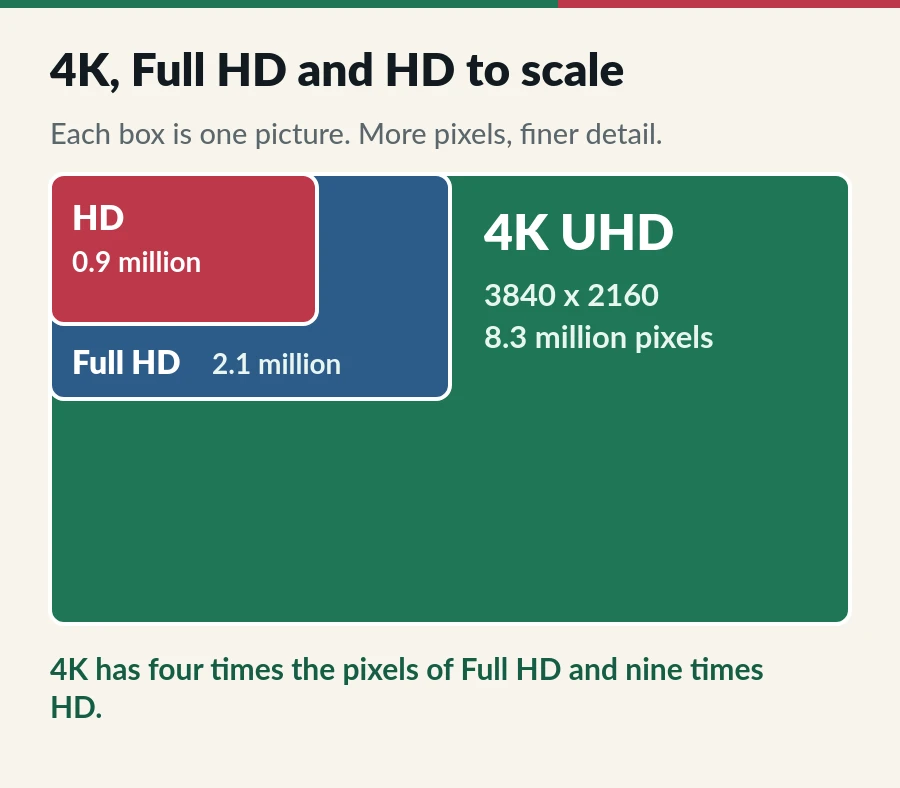
TV makers often say UHD or Ultra HD instead of 4K; on a TV they mean the same thing. HDR is a different feature: it is about brightness and colour, not sharpness, so a 4K stream may or may not be HDR. For the technical background, see the 4K resolution article on Wikipedia.
Think of 4K IPTV as a chain. Every link has to handle 4K, or the picture quietly drops to Full HD or HD and nothing on screen tells you why.
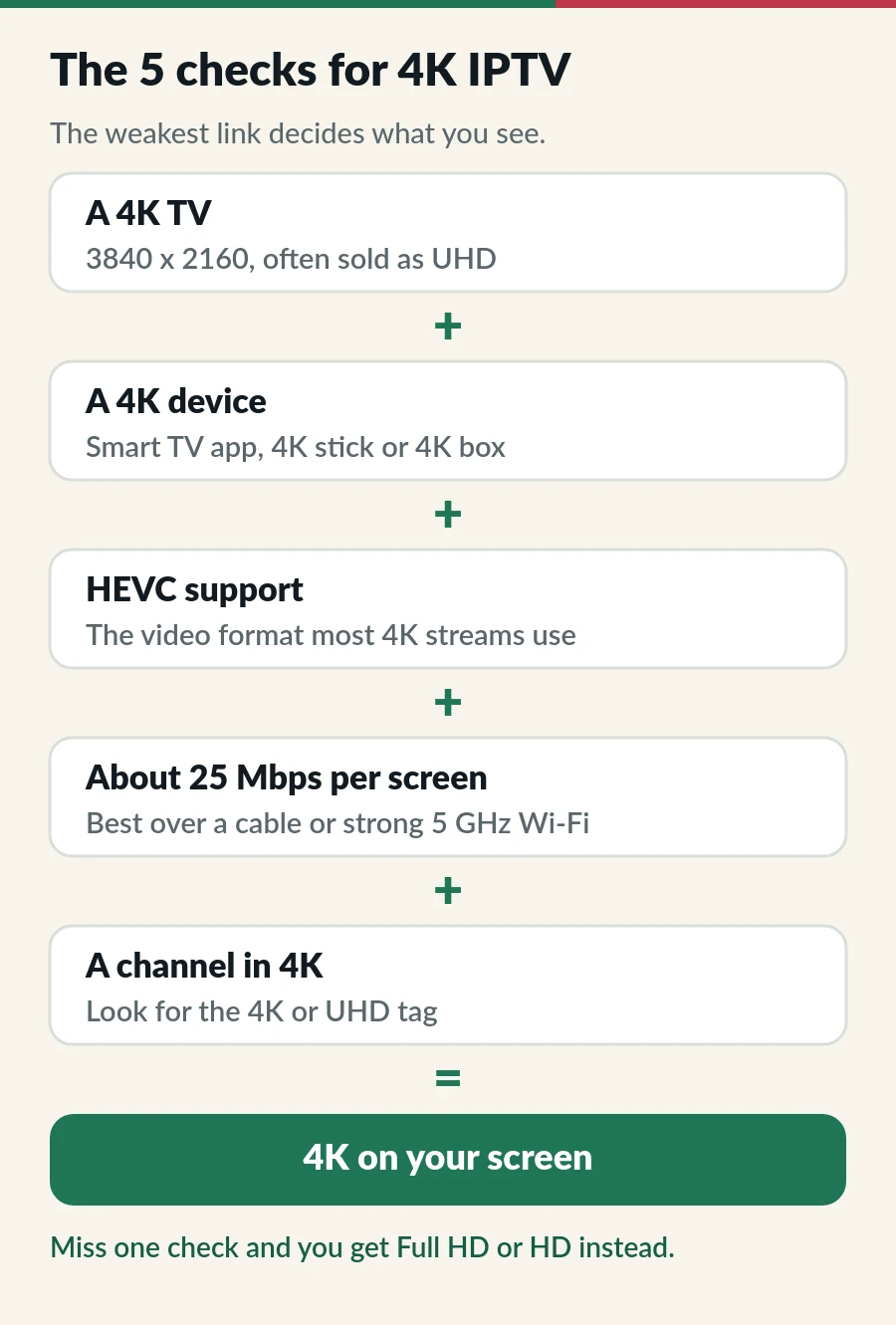
Look for 4K, UHD or 3840 × 2160 on the box, in the manual or in the TV settings. Most mid-size and large TVs sold in recent years are 4K; many smaller and older ones are Full HD.
If you watch through a stick or box, the HDMI port matters too. On Samsung TVs, turn on Input Signal Plus for that port (Settings > Connection or General > External Device Manager); older models call it HDMI UHD Color. LG TVs have a similar switch called HDMI Ultra HD Deep Colour.
If the player app runs on the TV itself, the TV is the device and this check is done. With a stick or box, check the model: the Fire TV Stick 4K and 4K Max play 4K, while the Lite and the basic HD stick stop at Full HD. Android TV boxes vary, so look for 4K on the box. Our IPTV on Firestick guide covers the setup.
Use the HDMI cable that came with the device, or one sold as Premium High Speed or Ultra High Speed. An old cable can limit 4K or drop the picture now and then. Wikipedia explains the HDMI versions and cable types.
Most 4K streams are compressed with HEVC, also called H.265. It fits a 4K picture into roughly half the data the older H.264 format would need. Current 4K TVs and 4K sticks decode HEVC with a dedicated chip; older devices may show a black picture with sound, or stutter.
In our channel list, some channels carry an HEVC tag. If one of them plays sound without a picture on your device, choose another version of that channel.
Our rule of thumb: about 10 Mbps per screen for HD, 15 Mbps for Full HD and 25 Mbps for 4K. Two 4K screens at the same time need about 50 Mbps.
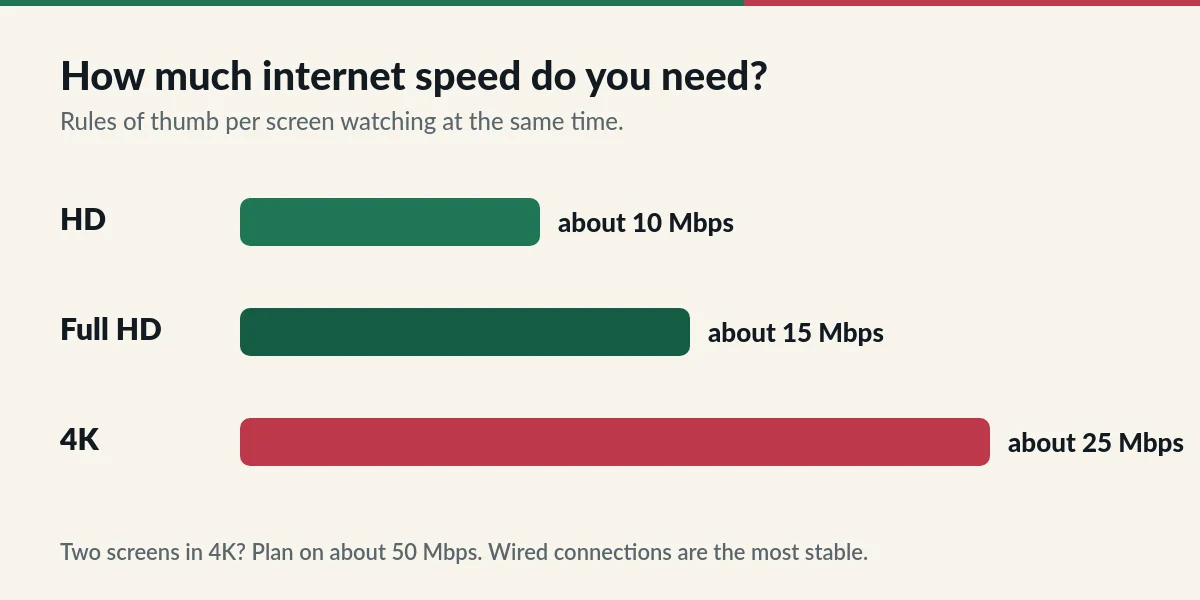
Singapore home fibre is rarely the problem, because plans are usually far faster than that. The weak spot is the last few metres of Wi-Fi. Run a speed test on the TV or stick itself, at the time you watch, not on your phone next to the router.
This is the check people miss. Most live channels broadcast in Full HD or HD, and a 4K TV simply upscales them to fill the screen. Upscaled HD can look very clean, but it is not true 4K.
In our Singapore channels list, the tags next to each name show the versions a channel has: 4K or UHD, FHD, HD and SD. Many of the 4K channels are live sport and big events. Films and series on demand come in 4K where the title is available in that format.
On a big screen, from a normal sofa distance, 4K looks clearly finer on content that was made in 4K. On a 32 or 43-inch TV across the room, the difference from Full HD is small, and a steady picture matters far more.
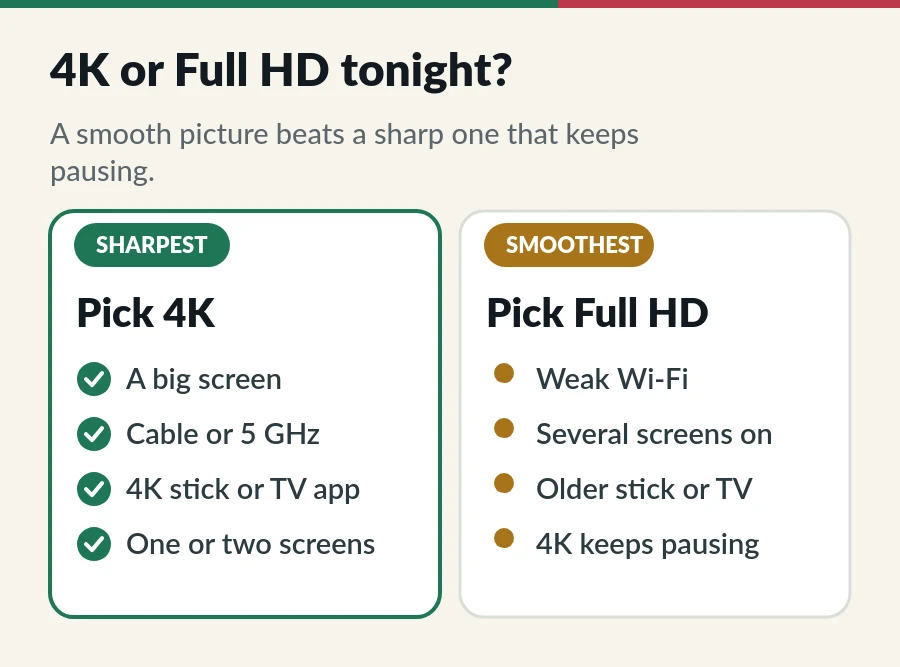
So 4K IPTV is worth it when you have the screen and the connection for it. When you do not, Full HD is the smarter choice and you lose very little. You never pay extra for 4K: Standard and Premium both include 4K, Full HD and HD where the channel or title offers them.
| What you see | Likely cause | What to do |
|---|---|---|
| The picture looks soft | The channel is HD or Full HD, upscaled | Pick the version with the 4K tag, if the channel has one. |
| 4K stutters, FHD is smooth | Wi-Fi or a busy connection | Use a cable or 5 GHz, pause downloads, or stay on FHD. |
| Sound but a black picture | The device cannot play HEVC | Choose another version, or use a newer 4K device. |
| The stick shows only 1080p | HDMI port, cable or display setting | Set the stick’s resolution to Auto or 4K, then try another HDMI port. |
| Colours look dull or dark | An HDR or HDMI setting | Turn on Input Signal Plus (Samsung) or HDMI Ultra HD Deep Colour (LG). |
| It was fine, now it buffers | A busy evening network | Work through our IPTV buffering fixes. |
4K IPTV works on both of our plans wherever a channel is available in 4K, so the choice comes down to channels and screens.
No. Standard and Premium both include 4K, Full HD and HD where the channel or title offers them. Premium adds channels and separate accounts; it does not change the picture quality.
About 25 Mbps per screen, steady, measured on the TV or stick. Two 4K screens at once need about 50 Mbps.
On TVs, yes: both mean 3840 × 2160 pixels. Cinema 4K is slightly wider at 4096 pixels, but TVs and streams use 3840.
A phone can play it, but a small screen cannot show the extra detail and it uses much more data. Choose FHD or HD on a phone.
About 11 GB an hour at 25 Mbps. That is fine on home fibre, which usually has no cap, but avoid 4K on mobile data.
Yes, if the TV is 4K and the player runs on it. Using the TV’s own app also avoids HDMI settings altogether. See IPTV on Samsung Smart TV or IPTV on LG Smart TV.
Page
Search 12,000+ live channels by country.
Guide
Find where it buffers, then nine fixes in order, easiest first.
Guide
Install a player from Apps, send us the MAC address and watch.
Guide
Developer options, Downloader, your player and sign-in.
4K, Full HD and HD are included with every plan, from S$15 a month.