Guide
Xtream Codes explained
The three login details, signing in step by step and error messages.
Explainer
An M3U playlist is the single web link that loads your IPTV channels in an app. Here is what is inside it, how to open it in VLC, TiviMate and Kodi, when an Xtream Codes login works better, and why the link deserves the same care as a password.
M3U is one of the oldest playlist formats around. It began in the 1990s as a way to list MP3 music files (the name comes from “MP3 URL”), and today almost every media player can read it. An M3U playlist is plain text: a list of names, each followed by the address where it can be played.
IPTV adopted the format because it is so simple. Your provider puts every channel into one playlist and gives you a link to it. Paste the link into a player app and the app reads the list, shows the channels and plays the one you pick. The M3U article on Wikipedia covers the technical side.
So when people search for a “Singapore IPTV M3U”, this is what they are after: the playlist of channels that comes with their subscription, delivered as a link.
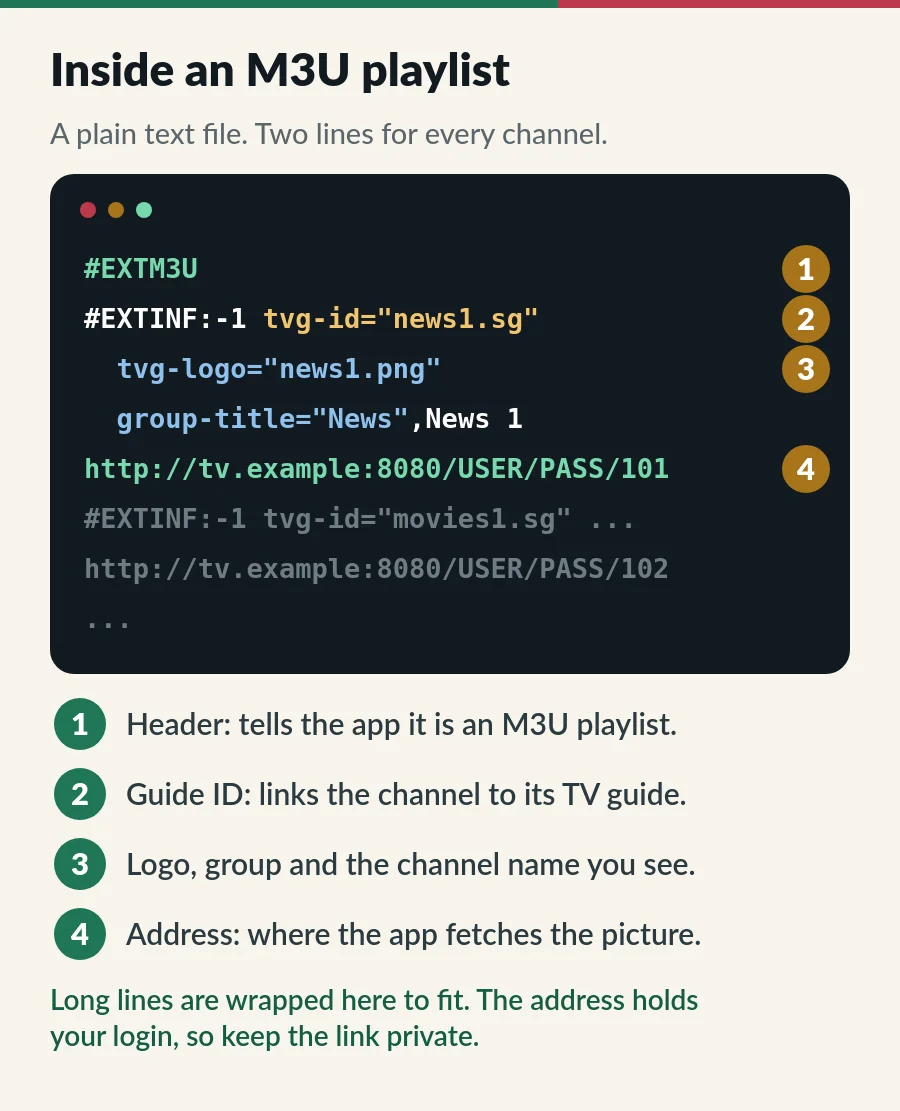
You never need to edit the file, but knowing its parts makes errors much easier to understand:
When a channel plays but shows no programme information, its tvg-id is usually the reason. Our guide to what EPG means in IPTV explains how the playlist and the TV guide are matched.
| Term | What it means | What to do |
|---|---|---|
| M3U link | A web address that sends the latest playlist each time the app asks | Use this: line-up changes reach you by themselves |
| M3U file | A copy of the playlist saved on a device | Avoid for live TV: the copy goes out of date |
| M3U8 | The same format saved as UTF-8 text, so names in any language display properly. Video streams (HLS) use the extension too | Opens the same way in most apps |
Some apps ask you to “upload” a playlist. Choose the URL option whenever there is one, because a saved file does not pick up changes to the channel list.
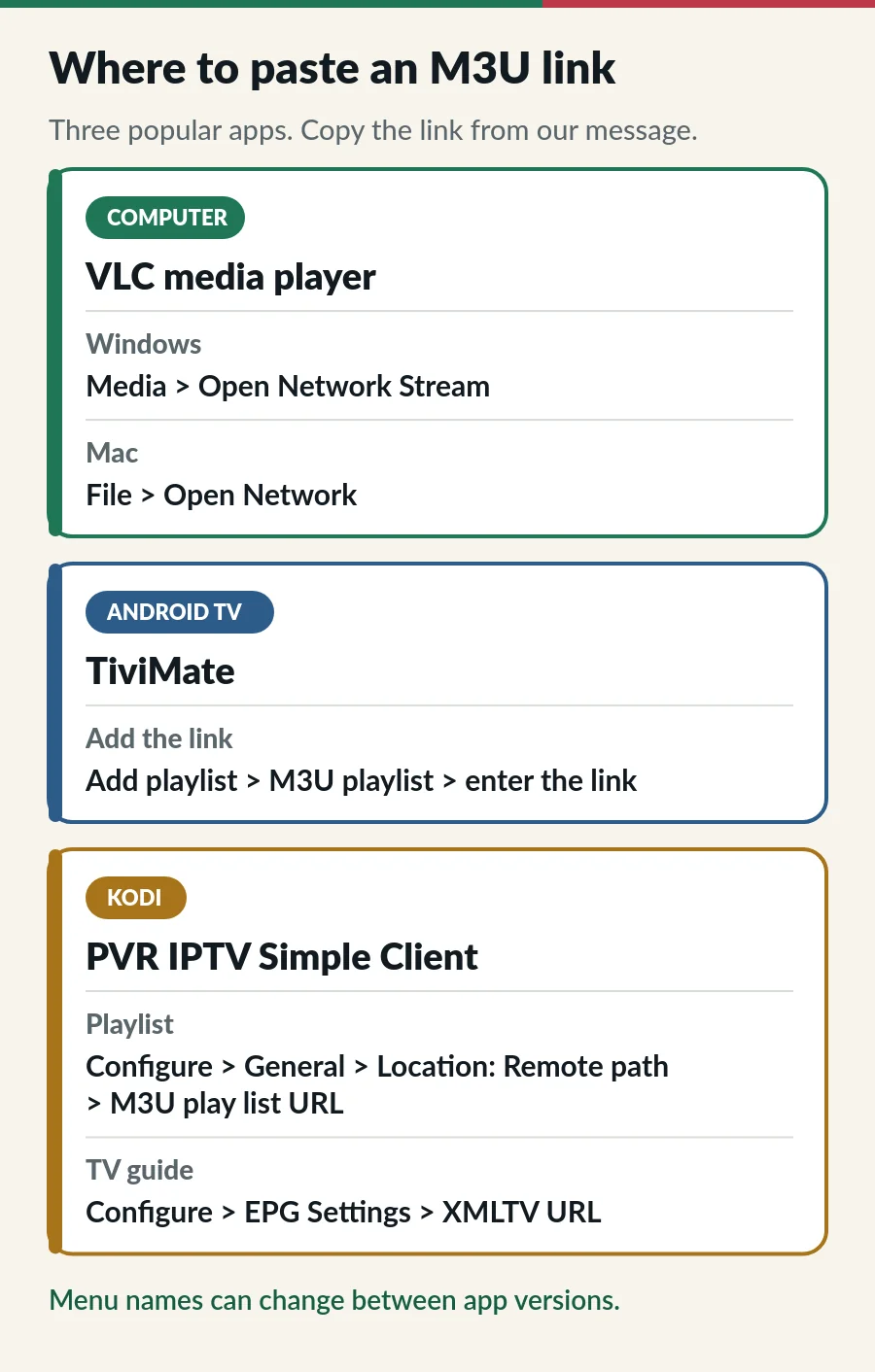
The free VLC media player is the quickest way to check a channel. On Windows choose Media > Open Network Stream; on a Mac, File > Open Network. Paste the link and press Play. VLC shows the channels as one long list with no TV guide, so it suits a quick test rather than an evening on the sofa.
Using VLC on a phone or TV too? Our guide to IPTV on VLC has the steps for every device.
In TiviMate, choose Add playlist, then M3U playlist, and enter the link. Typing a long link with a remote is slow, so many people pick the Xtream Codes option instead: three short details rather than one long line. Our IPTV on Android TV guide covers installing it. The TiviMate IPTV player guide shows both logins in TiviMate.
Kodi needs the free PVR IPTV Simple Client add-on. In its settings, set Location to Remote path and paste the link into M3U playlist URL. For the TV guide, add the EPG link under XMLTV URL. The Kodi wiki explains every setting.
Step-by-step pictures for Kodi 21 are in our PVR IPTV Simple Client guide.
In any other app, look for words such as Add playlist, M3U URL or Remote playlist. The steps never change: paste the link, give it a name, save, then allow a minute for the channels to load.
Most player apps accept both. An Xtream Codes login splits the same information into three boxes (server, username and password) and lets the app fetch the TV guide, films and series in tidy sections. An M3U playlist delivers everything as one long list. Our Xtream Codes guide shows how to turn one into the other.
Look closely at the link and you will find your username and password inside it. Anyone who has it can use your subscription, and their viewing counts against your screens. When too many screens play at once, streams stop, for you as well as for them.
Want it on another screen at home? The same link works within the number of screens on your plan. Our page on IPTV on multiple devices explains how Standard and Premium handle extra screens.
Your IPTV provider gives it to you with your subscription. At IPTV.sg we send your login by email and WhatsApp after you order; if your app needs the M3U link and it is not in the message, ask us and we send it.
Free playlists turn up online too, but they break often: links stop working within days, nobody updates them, and there is no one to ask when they fail. You can also build your own M3U playlist in a text editor for videos you already have, which is how the format started. For live TV channels, though, the playlist has to come from a provider.
Want a playlist that is kept up to date for you? See our IPTV plans in Singapore, from S$15 a month.
| Problem | Likely cause | Try this |
|---|---|---|
| Playlist will not load | Part of the link is missing | Copy the whole link again: it is long and easy to cut short |
| Loads, but nothing plays | Plan ended, or too many screens at once | Check your end date and close the app on other devices |
| Takes minutes to load | A very large list on a slow device | Use an Xtream Codes login, or a device with more memory |
| No TV guide | The app needs a separate EPG link | Ask us for it, or switch to an Xtream Codes login |
| Channels missing or renamed | An old saved copy of the playlist | Use the link, not a file, and refresh the playlist |
More fixes are in our IPTV troubleshooting guide.
Your M3U playlist comes with your plan. Here is how to choose one, order it and keep it running.
A list of your channels in the M3U text format, delivered as a web link. You paste the link into a player app and it loads the channels.
Usually one of two things: the M3U link, or the server URL used with an Xtream Codes login. Both come from your provider.
Install VLC, choose Media > Open Network Stream, paste the link and press Play. For a TV guide on a computer, Kodi with PVR IPTV Simple Client works well.
Almost. M3U8 is the same playlist format saved as UTF-8 text. Most apps open both.
Yes, within the number of screens on your plan. Each device playing at the same time counts as one screen.
Guide
The three login details, signing in step by step and error messages.
Guide
The TV guide explained, Singapore time and six quick fixes.
Guide
Six player apps compared by device, sign-in, TV guide and price.
Page
From login to first channel on every device.
Order a plan and we send your login by email and WhatsApp. If your app needs the M3U link, just ask.