Guide
Best IPTV player apps
Six player apps compared by device, sign-in, TV guide and price.
Player guide
VLC plays your IPTV channels for free on computers, phones, Apple TV and Android TV. Here is where the link goes on each device, how to find channels fast in a long list, what VLC cannot do and how to fix buffering.
VLC media player is the free, open-source player made by VideoLAN, a non-profit organisation. It plays almost any video file or network stream, and an IPTV playlist is exactly that: a list of streams, one for each channel. Give VLC your playlist link and it fetches the list, shows each channel by name and plays the one you pick.
Like every player, VLC has no channels of its own. Everything you watch with IPTV on VLC comes from your plan; with IPTV.sg, from the M3U link in the message we send by email and WhatsApp after you order. Our guide to the M3U playlist explains what is inside that link.
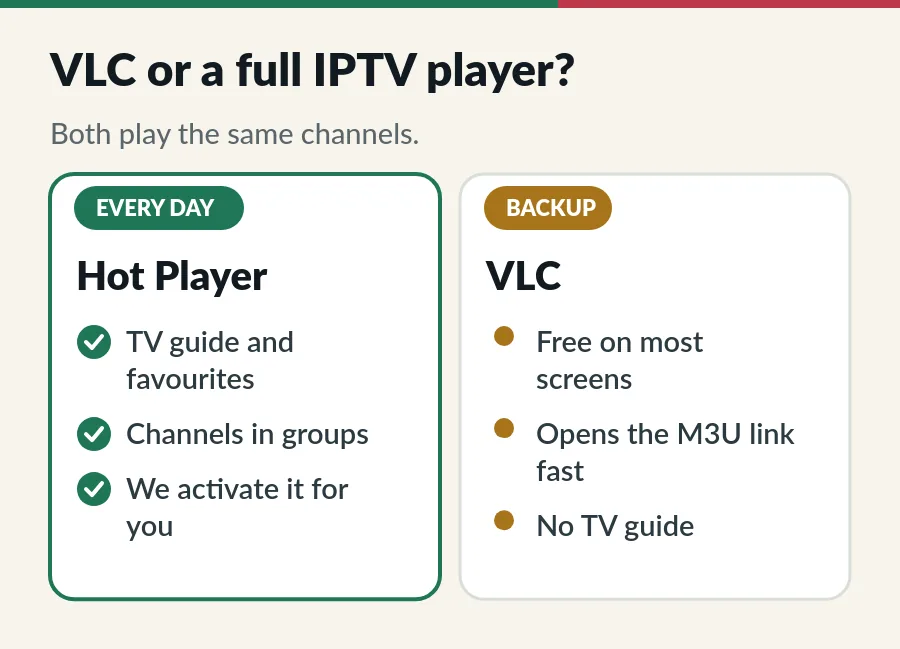
That makes VLC the handy second player: free, quick to open, and already installed on many computers. For a TV guide, favourites and channel groups, a full IPTV player is easier. Our list of the best IPTV player apps compares six of them, and Hot Player activation is part of every plan.
Each VLC window that plays a channel counts as one screen in your plan, the same as any other player, so close VLC on the computer before you switch to the TV. Our guide to IPTV on multiple devices explains how screens and accounts work on Standard and Premium.
The idea is the same on every device VLC runs on: give VLC the link, let it load the list, then choose a channel.
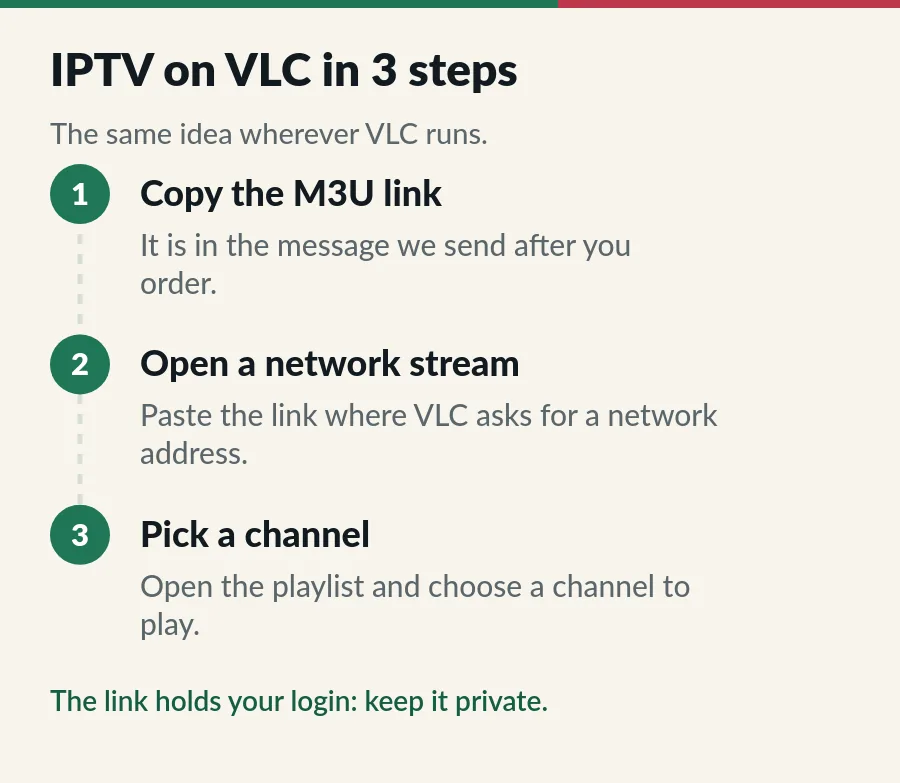
If VLC plays one channel and shows no list, the link you pasted was a single channel rather than the whole playlist. Copy the full M3U link from our message again.
Here is how to set up IPTV on VLC on each device, from computers to TVs.
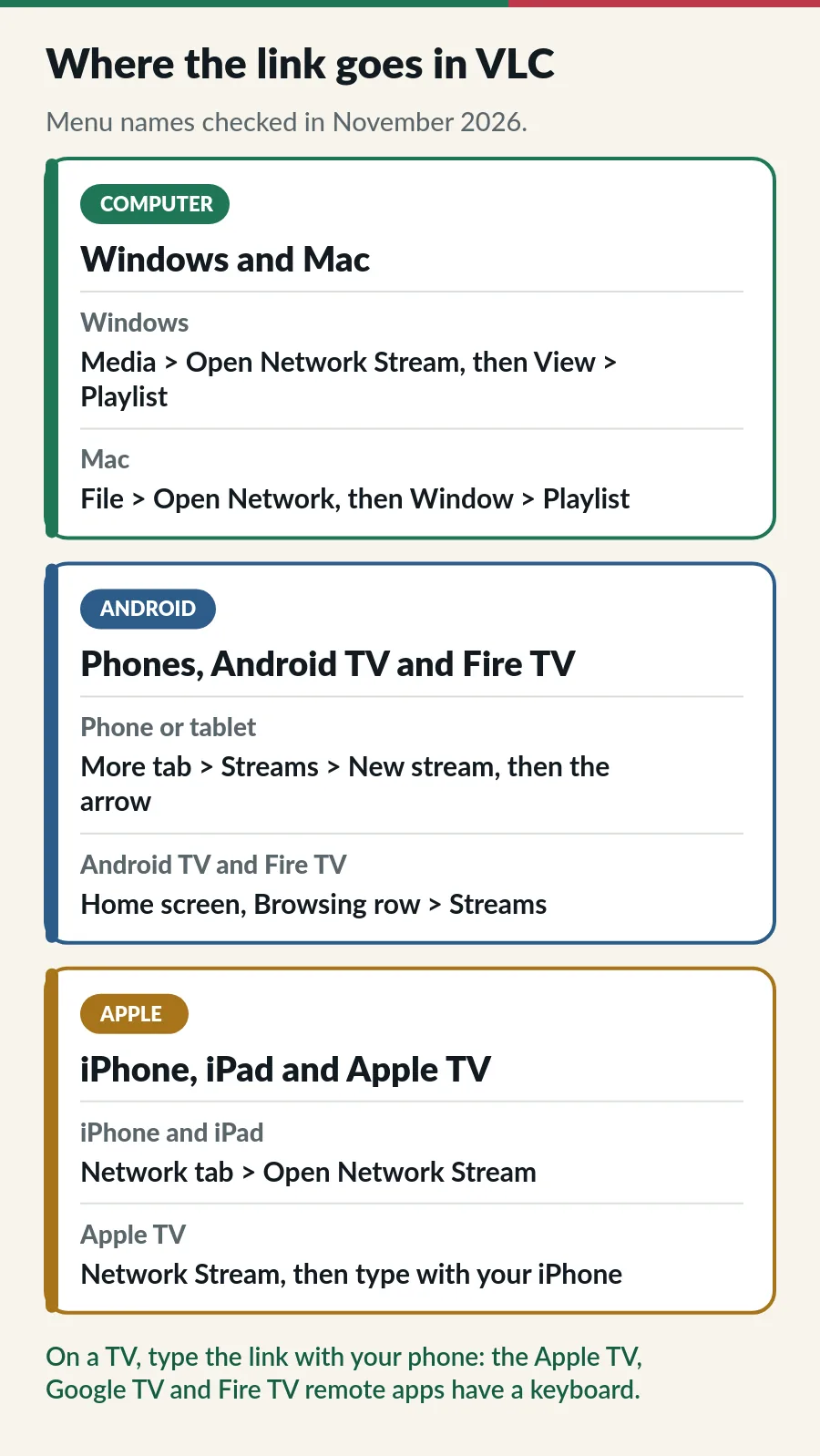
Open VLC and choose Media > Open Network Stream, or press Ctrl+N. Paste the link into the network URL box and choose Play. Then open View > Playlist (Ctrl+L) to see every channel, and double-click one to play it. Our IPTV for PC guide compares VLC with the other Windows players.
Choose File > Open Network, paste the link and choose Open. The channel list is under Window > Playlist. VLC runs on Intel and Apple silicon Macs, and our guide to IPTV on Mac covers the other players worth a look.
Open VLC, go to the More tab and find Streams. Tap New stream, paste the link and tap the arrow. Your recent streams are listed in the same place, so the next time takes one tap. To watch on the big screen, IPTV on Android phone shows three ways to get the picture onto your TV.
VLC has a TV layout on these screens. On its home screen, open Streams in the Browsing row and add your link there. Type it with your phone rather than the remote: the Google TV and Fire TV phone apps both have a keyboard. If VLC for Fire is not in the Appstore on your Fire TV model, use Hot Player instead (IPTV on Firestick).
Open the Network tab, tap Open Network Stream, paste the link and tap Open Network Stream again. On a phone, VLC uses mobile data when you are away from Wi-Fi, so check your data plan first; IPTV on iPhone and iPad has rough figures per hour.
Open Network Stream in VLC. When the text box opens, tap the Apple TV Keyboard alert on your iPhone and paste the link there instead of typing it with the remote. Our guide to IPTV on Apple TV compares VLC with the two Apple TV players we recommend.
VideoLAN does not make VLC for Samsung or LG smart TVs. On those TVs, install Hot Player from the TV’s own store (Samsung, LG).
A full IPTV plan has thousands of channels, and VLC shows them as one long list in playlist order. A few habits make that much easier:
Want to know what is in each plan before you search? Browse the IPTV Singapore channels list, sorted by country and type.
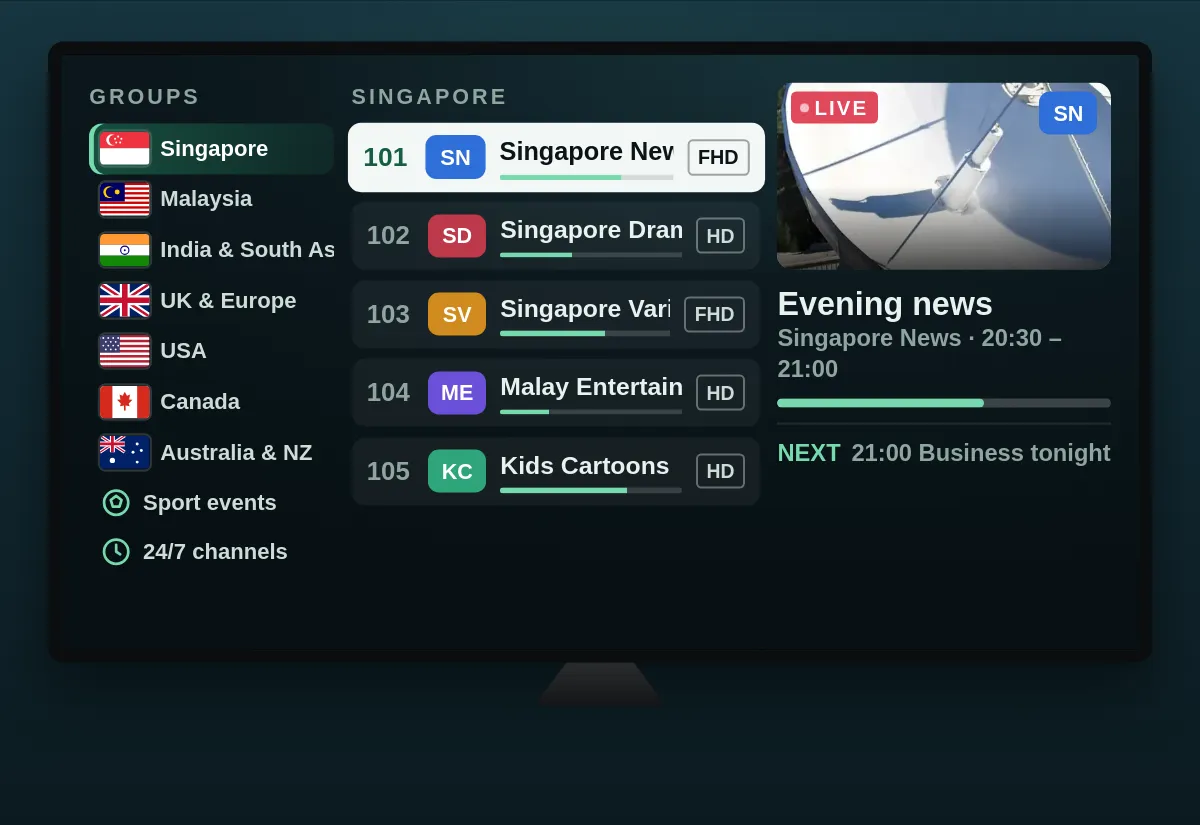
| You want | In VLC | In Hot Player |
|---|---|---|
| A TV guide (what is on now and next) | No: VLC does not load the guide that comes with your plan | Yes |
| Channels in groups, such as sport or news | One long list | Yes |
| Favourites | Only by saving a shorter playlist | Yes |
| Films and series menus | No separate menus | Yes |
| Setup help | We help with the link | Activation included in your plan |
So use IPTV on VLC for what it does well: checking in seconds that a channel or your login works, watching on a work computer, or keeping a backup when your usual app is updating. Our guide to EPG in IPTV explains what a TV guide adds, and the IPTV setup guide lists the right full player for each device.
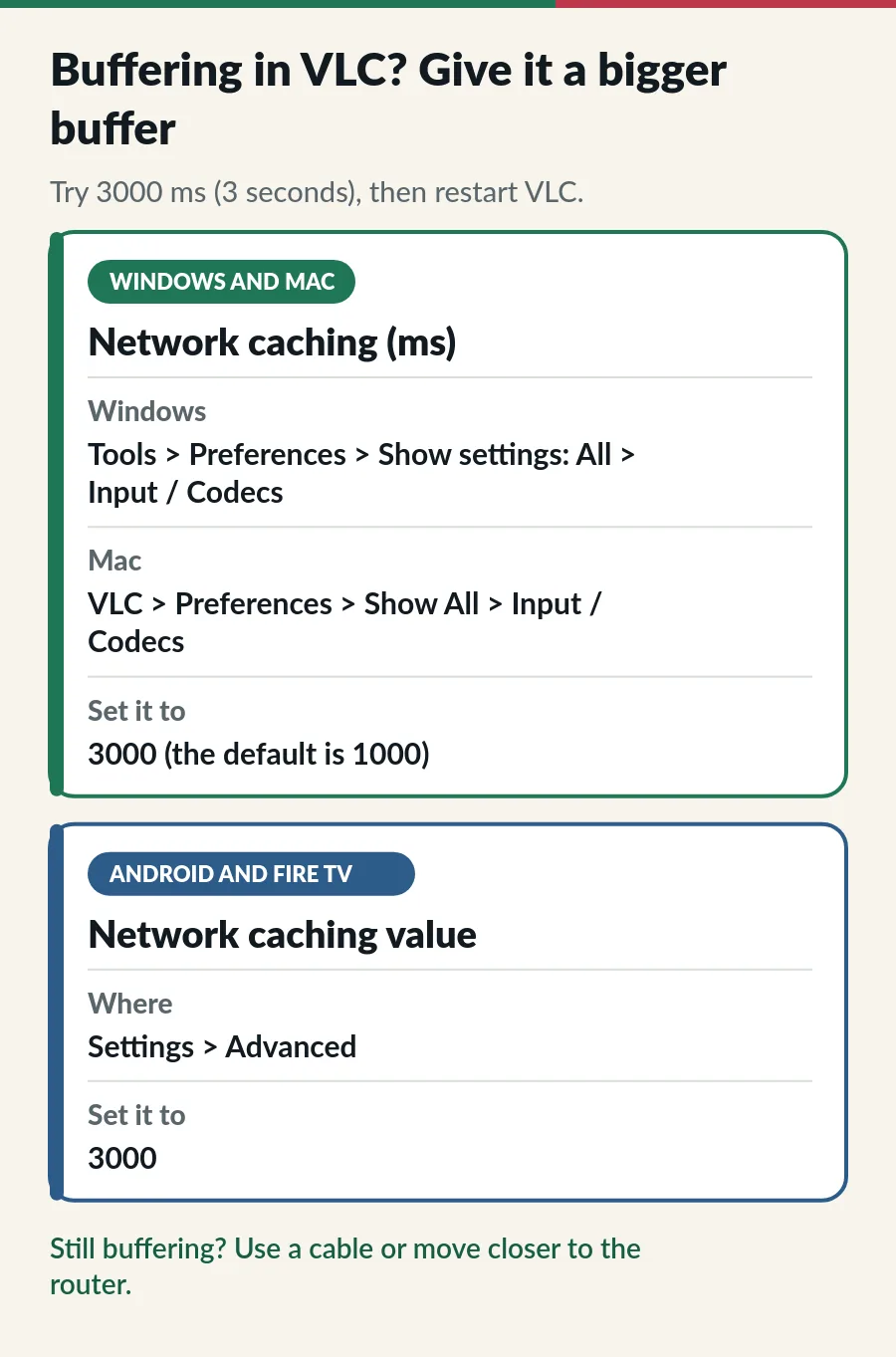
Most buffering in VLC comes from a short dip in the connection. VLC keeps one second of video in reserve by default; raising that to three seconds hides most dips, at the cost of a slightly slower start when you change channel.
| What you see | What to try |
|---|---|
| “Your input can’t be opened” or “VLC is unable to open the MRL” | Copy the M3U link again in full. Still failing? Check that your plan is active and that no other screen is using it, then message us. |
| Buffering or freezing | Raise network caching to 3000 ms as shown above, restart VLC, and use a cable or a stronger Wi-Fi signal. |
| One channel plays but there is no list | You pasted a single channel link. Use the full M3U link from our message. |
| Sound but no picture, or a frozen picture | Change the decoding setting: on Windows, Tools > Preferences > Input / Codecs > Hardware-accelerated decoding (try Disable); on Android, Hardware Acceleration in Settings. |
| Wrong language or no sound | On a computer, choose another track under Audio > Audio Track. |
| Picture stretched or cut off | On a computer, choose Video > Aspect Ratio, then Default. |
| Every channel fails at once | Your plan may have ended. Renew it and the same login works again. |
Buffering in every player, not only VLC? Work through our IPTV buffering fix, and the IPTV troubleshooting checks for other errors. Still stuck? Message us on WhatsApp with the device, the VLC version and a photo of the screen.
IPTV on VLC is a free way to watch your IPTV.sg channels; the plan brings the channels, the M3U link and our help on WhatsApp.
Yes. Paste an M3U playlist link into VLC’s network stream option and it plays each channel. VLC has no channels of its own: they come from your IPTV plan.
Yes, when you get it from videolan.org or the official app stores. It is free, open source and has no adverts. Avoid “VLC” downloads from other websites.
No. VLC does not load the TV guide (EPG) that comes with your plan. For a guide, use Hot Player, TiviMate, or Kodi with the PVR IPTV Simple Client.
Not directly: VLC only takes a link. Use the M3U link from our message, or ask us for it on WhatsApp. Our guide to Xtream Codes explains the difference.
A full plan has thousands of channels, and VLC reads the whole list before it plays. Give it a few seconds, or save a shorter playlist with only the channels you watch.
Guide
Six player apps compared by device, sign-in, TV guide and price.
Guide
What is inside the link, three apps to open it and how to keep it safe.
Guide
Install it on Android TV or Fire TV, add your login and see if Premium is worth it.
Guide
Where to get a safe player app, how to install it on each device and which APKs to avoid.
Message us on WhatsApp with your order number, and we send your M3U link and help you get VLC playing.