Guide
MyIPTV Player on Windows: setup in 5 steps
Add your playlist and TV guide on Windows or Xbox.
Device guide
IPTV for PC turns a Windows laptop or desktop into a TV screen. Here is which free player to choose, how to set it up in four steps, how to send the picture to your TV and how to fix the usual problems.
Most people watch IPTV on the living room TV, but a Windows laptop or desktop is a handy second screen: in a study, a bedroom, a home office or a student room. IPTV for PC also has one quiet advantage over a TV: the keyboard. The playlist link we send is long, and on a PC you simply copy it from WhatsApp or your email and paste it into the player. No typing with a remote.
A PC can also feed a bigger screen. With one HDMI cable, a laptop becomes the source for a TV or a projector, which helps when your TV has no app store of its own. Our list of IPTV supported devices shows where computers fit next to smart TVs, sticks and phones.
A player is only the screen: it has no channels of its own, and the channels come from your plan. On Windows, three free players do the job well. Pick by what you want to do.
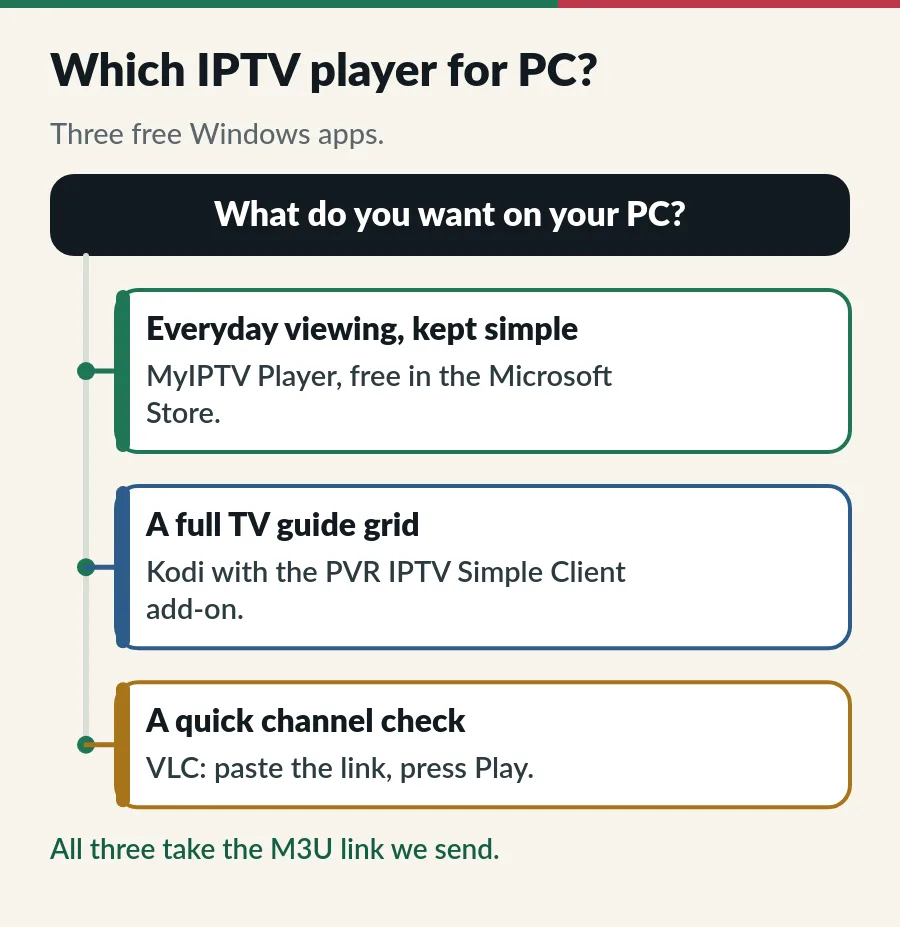
| Player | Best for | TV guide | Where to get it |
|---|---|---|---|
| MyIPTV Player | Everyday viewing, simple menus | Yes, from the EPG link | Microsoft Store, free |
| Kodi + PVR IPTV Simple Client | A full guide grid and big lists | Yes, from the EPG link | Microsoft Store or kodi.tv, free |
| VLC | A quick check of one channel | No | videolan.org, free |
MyIPTV Player is the easiest start: it lives in the Microsoft Store, takes both links and shows a tidy guide. Our MyIPTV Player on Windows guide walks through it screen by screen. Kodi is a bigger media centre; with the free PVR IPTV Simple Client add-on it shows a full TV guide grid, and it suits people who like to tweak. VLC opens the playlist in seconds, but as one long list with no guide, so keep it for testing.
Choosing VLC? Our guide to IPTV on VLC covers its playlist, keyboard shortcuts and the buffering fix.
Choosing Kodi? Our PVR IPTV Simple Client guide shows where each link goes and how to fix an empty guide.
Looking for IPTV Smarters Pro for PC? When we checked on 31 October 2026, the website that used to offer its computer version was offline; our IPTV Smarters Pro guide has the details. Some guides suggest running Android apps through an emulator instead. It can work, but it adds a heavy extra program and one more thing to go wrong, so a native Windows player is the better choice for IPTV for PC. The best IPTV player apps guide compares players for every other screen.
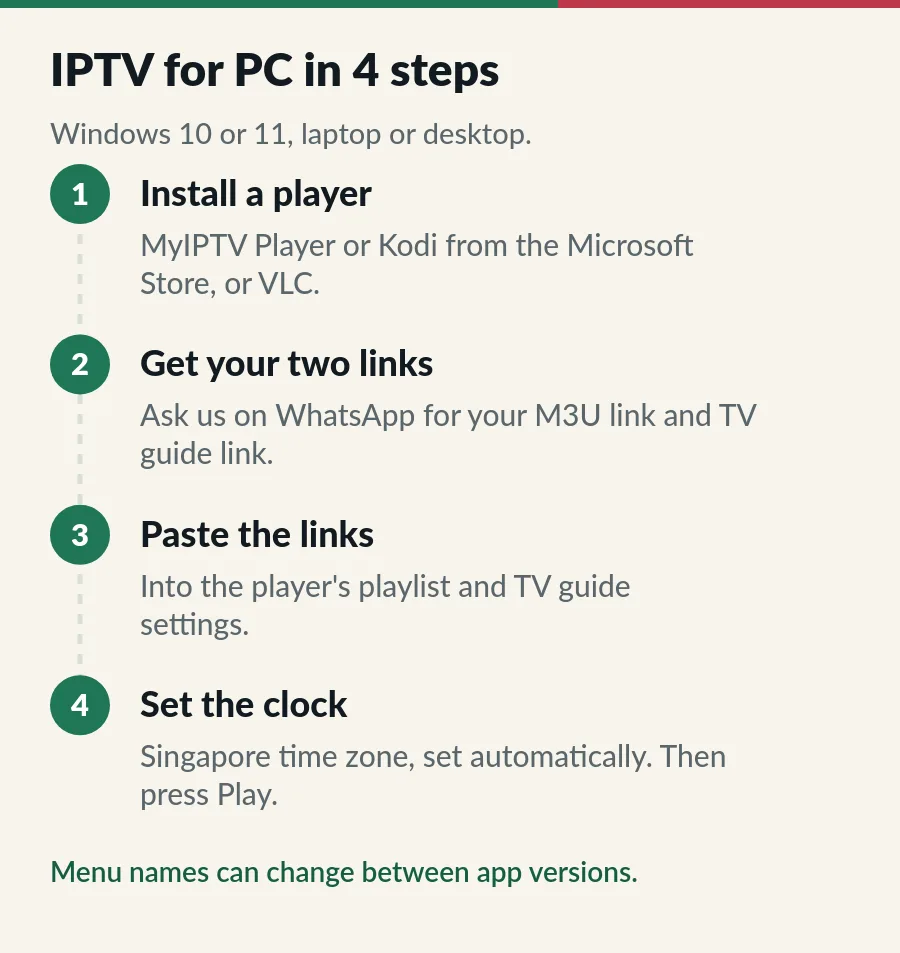
Menu names can change from one app version to the next; if a button is called something slightly different, look for the playlist or channel list settings. Our M3U playlist guide explains what is inside the link, and the EPG guide covers an empty or wrong guide.
Want the big screen? Connect the laptop to the TV with an HDMI cable and switch the TV to that HDMI input. Then press the Windows key and P together and choose Duplicate (the same picture on both screens) or Second screen only (the picture on the TV alone). If the sound stays on the laptop, click the speaker icon in the taskbar and pick the TV as the output.
For everyday viewing on a TV, a dedicated device is usually easier than IPTV for PC: a Fire TV Stick or an Android TV box runs Hot Player, which we activate for you. See the IPTV setup guide for each device.
Install players only from the Microsoft Store or the developer’s own website. Sites that offer “IPTV for PC” downloads with free channels, cracked apps or codec packs are a common source of unwanted software. VLC and Kodi already include what they need to play video, so you never need a separate codec pack.
Treat your links like a password: the M3U link contains your username and password. Do not post it in groups or paste it into websites that offer to “check” playlists. If you think it has leaked, message us and we help you secure your account. Screens you add at home count within your plan; our page on IPTV on multiple devices explains how.
| What you see | What to try |
|---|---|
| No channels after adding the link | Check the M3U link was copied in full, with no space at the end, then refresh the playlist. |
| TV guide is empty | Add the EPG link, save and give it a few minutes to load. |
| Guide times are hours out | Set the Windows time zone to (UTC+08:00) Kuala Lumpur, Singapore, set automatically. |
| Picture stops and starts | Use a network cable and pause downloads; see the IPTV buffering fixes. |
| Stops when another screen starts | Check how many screens your plan covers (Standard vs Premium). |
| Plan expired message | Renew before the end date to keep your login (see IPTV renewal). |
Still stuck? Work through the IPTV troubleshooting checks in order, or message us on WhatsApp with the app name and a photo of the screen.
With IPTV for PC the player is free; the channels come from your plan. Here is where to go next.
Yes. MyIPTV Player, Kodi and VLC are all free on Windows, so IPTV for PC costs nothing beyond your plan. The channels come from your IPTV subscription.
For everyday viewing, MyIPTV Player. For a full TV guide grid, Kodi with PVR IPTV Simple Client. For a quick check of one channel, VLC.
Use a player app rather than a web browser for the most reliable playback.
The Windows players in this guide use the M3U link. If your app asks for a server URL, username and password instead, see our Xtream Codes guide.
Yes, within your plan: Standard covers 1 to 3 devices on one account, and each Premium account plays on one screen at a time.
Yes. VLC and Kodi also run on a Mac. Our IPTV on Mac guide has the steps for macOS.
Guide
Add your playlist and TV guide on Windows or Xbox.
Guide
Six player apps compared by device, sign-in, TV guide and price.
Guide
What is inside the link, three apps to open it and how to keep it safe.
Page
Smart TVs, sticks, phones, tablets and computers.
Message us on WhatsApp and we send your M3U and TV guide links for your PC.