Guide
IPTV on Firestick in 5 steps
Developer options, Downloader, your player and sign-in.
Setup guide
IPTV Smarters Pro is a free player app: it plays the channels, films and TV guide from your IPTV subscription, but has no content of its own. Here is where to get it in 2026, how to sign in with Xtream Codes in four steps and how to fix the errors people hit most.
IPTV Smarters Pro is a player app made by WHMCS Smarters. Think of it as an empty TV set: it gives you menus, a TV guide, a search box and a video player, but no channels of its own. Everything you watch comes from your IPTV subscription.
That clears up the most common confusion. When people search for an “IPTV Smarters Pro login”, they are looking for a username that only their IPTV provider can give them. You do not create an account with Smarters; you type in the login that came with your plan.
Most fibre plans in Singapore are far faster than that, and the country’s home broadband is among the quickest in the world on the Speedtest Global Index. When a picture stutters, the weak link is nearly always Wi-Fi inside the flat, not the plan itself.
Where you get the app has changed. When we checked the official stores from Singapore on 31 October 2026, IPTV Smarters Pro was no longer listed on Google Play, and the website that used to offer the Android, Fire TV and computer versions was offline. On iPhone and iPad it is still in the App Store, as Smarters Player Lite.
| Device | Where to get it | Good to know |
|---|---|---|
| iPhone and iPad | App Store | Listed as Smarters Player Lite, by WHMCS Smarters. More in IPTV on iPhone and iPad. The same app runs on Apple TV: see IPTV on Apple TV. |
| Android phone or tablet | Not on Google Play | Use Hot Player, which is included with your plan. |
| Android TV and Google TV | Not on Google Play | Use Hot Player, or TiviMate from Google Play. See our Android TV guide. |
| Fire TV Stick | No official source | Install Hot Player with the app code we send you. Our IPTV on Firestick guide shows how. |
| Windows and Mac | No official download | The old download page is offline. VLC plays your M3U link for a quick check. |
| Samsung and LG TVs | Depends on the model | If it is missing, use Hot Player instead. See our Samsung TV guide or LG TV guide. |
Already have the app on your device? It usually keeps working with your login, but it may no longer get updates. Whatever you install, use an official store: copies on download sites are often old, full of adverts, or worse. Apps with look-alike names in the stores come from other developers, so check that the developer is WHMCS Smarters.
http:// and the port number at the end.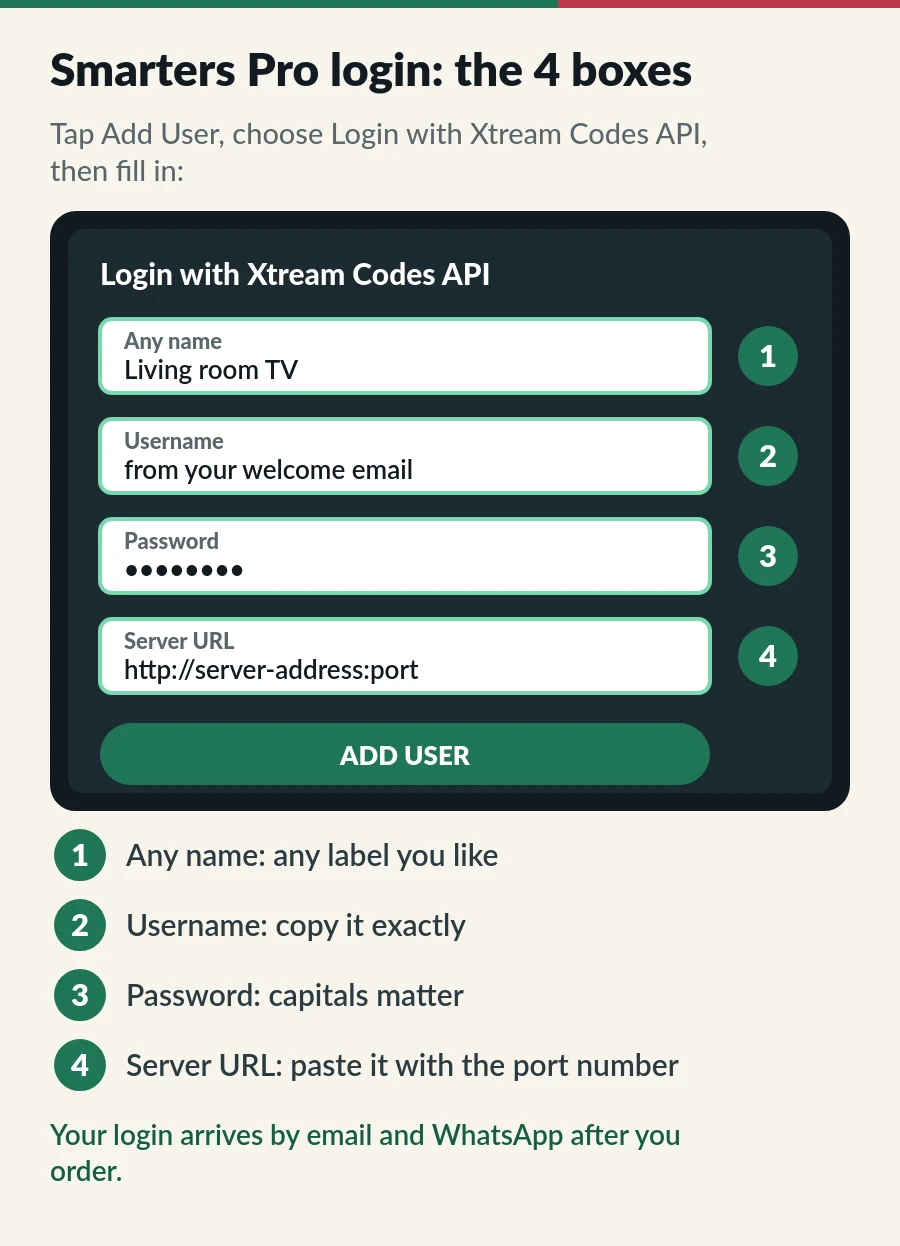
Long server addresses are painful to type with arrow keys. On Fire TV, the free Amazon Fire TV app turns your phone into a keyboard; on Android TV and Google TV, the Google TV app does the same. Type or paste the address on your phone and it appears on the TV.
IPTV Smarters Pro accepts two kinds of login. An Xtream Codes login is three details (username, password, server) and lets the app fetch the TV guide, films and series by itself. An M3U link is a single long web address that lists every channel.
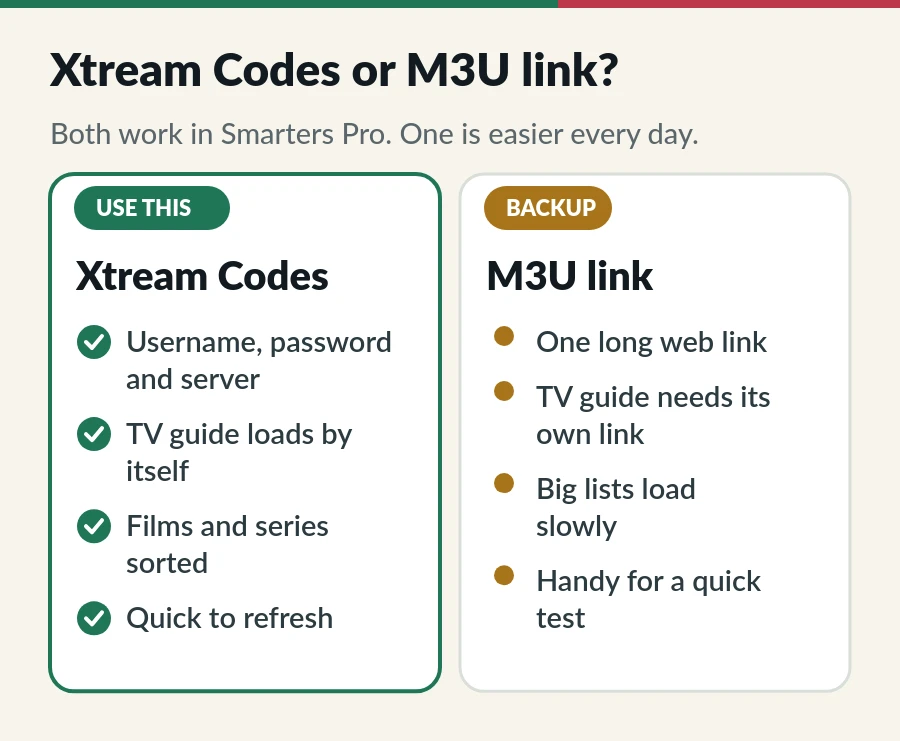
Our advice: use Xtream Codes on every device. Keep the M3U link as a backup, for example to check a channel quickly in VLC on a laptop.
Want the full picture on both logins? Read Xtream Codes explained and our M3U playlist guide.
Guide still empty, or hours out? Our EPG guide walks through six quick fixes.
| What you see | Usual cause | What to do |
|---|---|---|
| Invalid credentials or authentication failed | A typo, a capital letter, or an expired plan | Copy and paste the login again; check your plan’s end date. |
| Unable to connect to the server | Wrong server URL or missing port | Paste the full address with http:// and the port. |
| Stuck on loading channels | A very large list on a slow device | Wait a minute, use Xtream Codes instead of M3U, clear the app cache. |
| TV guide is empty | The EPG has not loaded yet | Refresh the EPG in Settings and give it a few minutes. |
| One channel buffers | That channel’s source | Try another channel, or open it in an external player. |
| Every channel buffers | Wi-Fi or the home network | Restart the router, use 5 GHz Wi-Fi or a cable. More fixes in our IPTV buffering guide. |
Both work with your IPTV.sg login, so this is about taste. Hot Player is included with every plan: one activation per device on Standard and one per account on Premium. You install it, send us the MAC address shown on its start screen, and we activate it. IPTV Smarters Pro is free and signs in with Xtream Codes, but outside iPhone and iPad it is now hard to get.
Many households mix them: Hot Player on the living-room Smart TV, Smarters Player Lite on an iPad. Our guide to the best IPTV player apps compares six options side by side.
IPTV Smarters Pro is only the player: the plan you sign in with decides your channels and how many screens you can use.
The app is free to download. The channels, films and series come from your IPTV subscription, which is a separate purchase.
It is the username, password and server URL from your IPTV provider. You do not sign up with Smarters itself.
It is not in every TV app store, and availability changes by model and region. Use Hot Player, which is included with your plan, or plug in a Fire TV Stick.
No. When we checked from Singapore on 31 October 2026, neither IPTV Smarters Pro nor Smarters Player Lite was listed on Google Play. Apps with similar names there come from other developers. On Android, use Hot Player, which is included with your plan, or TiviMate on Android TV.
Not easily at the moment. The desktop version came from the developer’s old website, which is offline. On a computer, VLC plays your M3U link for a quick check, and Kodi can show a full TV guide.
It depends on your plan. Standard lets one, two or three devices share one account; Premium gives each viewer a separate account. The multiple devices guide explains the difference.
Guide
Developer options, Downloader, your player and sign-in.
Guide
Six player apps compared by device, sign-in, TV guide and price.
Guide
Install a player from Apps, send us the MAC address and watch.
Page
From login to first channel on every device.
Plans from S$15 a month. Your login arrives by email and WhatsApp, ready for the app.